Better Data.
Less Work.
Record IEP goal progress on your phone, right next to the student. Pink Cow timestamps it, keeps you on track, and has the report ready on Friday.
Sam is a sample student. Seven days, no card, nothing to cancel.
1. Open the app. Your day at a glance — what is coming up, your to-dos, and what your team has recorded.
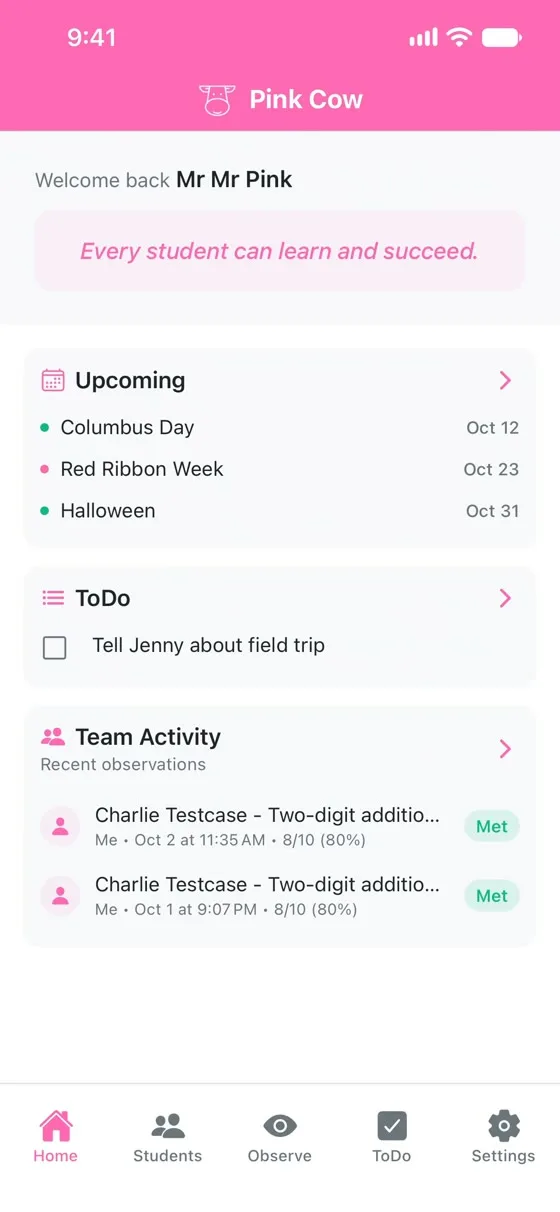
Step 1 of 7 · a real recording, with sample students
Everyone else adds to your list. We take things off it.
You became a teacher to teach. Every year someone adds one more thing to track, and nobody adds time.
One more thing, every year
Legislatures and administrators keep adding requirements. The school day stays the same length.
The desk round trip
Work with a student, walk back to the computer, type it in, walk to the next one. The observation goes cold on the way.
Pace is easy to lose
Each goal needs a set number of data points. Falling behind usually shows up at report time, when it is too late to fix.
Teacher-first. You are the customer.
Most of the software in your classroom arrived from above you. Someone chose it, someone rolled it out, and you were trained on it in August.
Pink Cow starts at the other end. You decide whether it earns its place, because you are the one standing next to the student. It costs the same as a cup of coffee, and you can try it this afternoon.
Districts are welcome, and we build for them too — reports, visibility, and convenient access to records they already own under IDEA. But a district paying for Pink Cow is buying its teachers something those teachers already chose. Bought for you, not aimed at you.
It is built by a special education teacher and his father, which is why it knows what a Tuesday actually looks like.
Better data
Every observation is timestamped where it happens, and scored against the goal exactly as the IEP wrote it — percent, fractions, counts, consecutive sessions, varying item counts. The goal text is copied from the IEP word for word.
Less work
Walk up, conduct the observation, tap the score. It is recorded before you would have reached your desk, because you never had to go. It works with bad cell coverage or wifi, and syncs when you are back. Paste a goals section from an IEP and Pink Cow reads the goals in; paste a bell schedule and it builds one.
On track
Pink Cow holds your district calendar. A week of spring break or a day of in-service does not make you behind — those days are not counted against you. Three quiet weeks on a goal does, so we prompt you about it on Monday morning rather than at the IEP meeting.
A week with Pink Cow
Monday
An email points you at the week ahead — who needs observations, and which dates are coming. The plan itself sits behind your login, not in the message, because an inbox is not a safe place for a child's name.
During the week
Observe at the student's side, on your phone, in seconds. The dashboard shows what is on pace and what needs attention.
Friday
The report is already written. Print it, or export every observation as a spreadsheet for a district request or a transfer.
Bring your paras
More hands collecting better data on your kids — not more seats. Upgrade to our Classroom Edition and you can invite a paraeducator by email or join code, choose which students each one can see, and their observations land on the same goals, in your reports, each attributed to whoever took it.
What we will not do with a child's information
No photos of students
There is no way to take or attach a photo of a student. The app has no camera, and the browser is told to refuse one.
A parent says yes first
Nothing is recorded about a child until a parent agrees. That rule lives in the database rather than the app, so it holds everywhere — website, phone, anything else that connects.
Short names in email
Reminders use a nickname or initials, never a full name. Remember that email can sit in an inbox for years and show its subject on a lock screen.
The IEP's words stay the IEP's words
When Pink Cow reads a pasted goal it copies the text exactly, and flags anything it is unsure of for you to check before it is saved.
Pricing as Simple as Your Morning Coffee
Skip one coffee a month. Get tools that save hours every week.
Teacher Edition
Same as a Starbucks Grande Pike
- Unlimited students
- Unlimited goals & observations
- Basic reporting
- Email support
Classroom Edition
Two Grande Pikes, but add all your Paras!
- Unlimited students
- Team collaboration
- Advanced reporting
- Priority support
Save 20% with annual billing • School and district pricing available
See all pricing plans →The data takes care of itself.
You take care of the kids.
Meet Sam, a sample student, and record a real observation. Seven days, no card, and nothing of your own to set up first.
Try it with Sam